Setup
First, we will load the AEME and aemetools
package:
Create a folder for running the example calibration setup.
tmpdir <- "sa-test"
dir.create(tmpdir, showWarnings = FALSE)
aeme_dir <- system.file("extdata/lake/", package = "AEME")
# Copy files from package into tempdir
file.copy(aeme_dir, tmpdir, recursive = TRUE)
#> [1] TRUE
path <- file.path(tmpdir, "lake")

list.files(path, recursive = TRUE)
#> [1] "aeme.yaml"            "data/hypsograph.csv"  "data/inflow_FWMT.csv"
#> [4] "data/lake_obs.csv"    "data/meteo.csv"       "data/outflow.csv"
#> [7] "data/water_level.csv" "model_controls.csv"
Build AEME ensemble
Using the AEME functions, we will build the AEME model
setup. For this example, we will use the glm_aed model. The
build_aeme function will
aeme <- yaml_to_aeme(path = path, "aeme.yaml")
model_controls <- AEME::get_model_controls()
inf_factor = c("dy_cd" = 1, "glm_aed" = 1, "gotm_wet" = 1)
outf_factor = c("dy_cd" = 1, "glm_aed" = 1, "gotm_wet" = 1)
model <- c("gotm_wet")
aeme <- build_aeme(path = path, aeme = aeme,
                   model = model, model_controls = model_controls,
                   inf_factor = inf_factor, ext_elev = 5,
                   use_bgc = TRUE)
Description of Sensitivity Analysis method
The sensitivity analysis method used here is based on the Sobol
method and uses the sensobol package.
This package provides several functions to conduct variance-based uncertainty and sensitivity analysis, from the estimation of sensitivity indices to the visual representation of the results. It implements several state-of-the-art first and total-order estimators and allows the computation of up to fourth-order effects, as well as of the approximation error, in a swift and user-friendly way.
For more information on the method, see the sensobol package vignette.
Load parameters to be used for the sensitivity analysis
Parameters are loaded from the aemetools package within
the aeme_parameters dataframe. The parameters are stored in
a data frame with the following columns:
model: The model namefile: The file name of the model parameter filename: The parameter namevalue: The parameter valuemin: The minimum value of the parametermax: The maximum value of the parameter
Parameters to be used for the calibration. (man)
utils::data("aeme_parameters", package = "AEME")
param <- aeme_parameters |>
  dplyr::filter(file != "wdr")
param| model | file | name | value | min | max | group | index | module | var_sim |
|---|---|---|---|---|---|---|---|---|---|
| glm_aed | glm3.nml | light/Kw | 5.8e-01 | 0.100 | 5.52e+00 | NA | NA | hydrodynamic | HYD_temp|HYD_thmcln |
| glm_aed | met | MET_wndspd | 1.0e+00 | 0.700 | 1.30e+00 | NA | NA | hydrodynamic | HYD_temp|HYD_thmcln |
| glm_aed | met | MET_radswd | 1.0e+00 | 0.700 | 1.30e+00 | NA | NA | hydrodynamic | HYD_temp |
| glm_aed | glm3.nml | mixing/coef_mix_conv | 1.4e-01 | 0.100 | 2.00e-01 | NA | NA | hydrodynamic | HYD_thmcln |
| glm_aed | glm3.nml | mixing/coef_wind_stir | 2.1e-01 | 0.200 | 3.00e-01 | NA | NA | hydrodynamic | HYD_thmcln |
| glm_aed | glm3.nml | mixing/coef_mix_shear | 1.4e-01 | 0.100 | 2.00e-01 | NA | NA | hydrodynamic | HYD_thmcln |
| glm_aed | glm3.nml | mixing/coef_mix_turb | 5.6e-01 | 0.200 | 7.00e-01 | NA | NA | hydrodynamic | HYD_thmcln |
| glm_aed | glm3.nml | mixing/coef_mix_hyp | 7.4e-01 | 0.400 | 8.00e-01 | NA | NA | hydrodynamic | HYD_thmcln |
| glm_aed | inf | inflow | 1.0e+00 | 0.500 | 2.50e+00 | NA | NA | hydrodynamic | LKE_lvlwtr |
| gotm_wet | gotm.yaml | turbulence/turb_param/k_min | 6.0e-07 | 0.000 | 1.00e-05 | NA | NA | hydrodynamic | HYD_thmcln |
| gotm_wet | gotm.yaml | light_extinction/A/constant_value | 5.5e-01 | 0.395 | 6.59e-01 | NA | NA | hydrodynamic | HYD_temp|HYD_thmcln |
| gotm_wet | gotm.yaml | light_extinction/g1/constant_value | 5.9e-01 | 0.440 | 7.40e-01 | NA | NA | hydrodynamic | HYD_temp|HYD_thmcln |
| gotm_wet | gotm.yaml | light_extinction/g2/constant_value | 2.0e-01 | 0.050 | 2.70e+00 | NA | NA | hydrodynamic | HYD_temp|HYD_thmcln |
| gotm_wet | met | MET_wndspd | 1.0e+00 | 0.700 | 1.30e+00 | NA | NA | hydrodynamic | HYD_temp|HYD_thmcln |
| gotm_wet | met | MET_radswd | 1.0e+00 | 0.700 | 1.30e+00 | NA | NA | hydrodynamic | HYD_temp |
| gotm_wet | inf | inflow | 1.0e+00 | 0.500 | 2.50e+00 | NA | NA | hydrodynamic | LKE_lvlwtr |
| dy_cd | cfg | light_extinction_coefficient/7 | 9.0e-01 | 0.100 | 1.40e+00 | NA | NA | hydrodynamic | HYD_temp|HYD_thmcln |
| dy_cd | dyresm3p1.par | vert_mix_coeff/15 | 2.0e+02 | 50.000 | 7.50e+02 | NA | NA | hydrodynamic | HYD_thmcln |
| dy_cd | met | MET_wndspd | 1.0e+00 | 0.700 | 1.30e+00 | NA | NA | hydrodynamic | HYD_temp|HYD_thmcln |
| dy_cd | met | MET_radswd | 1.0e+00 | 0.700 | 1.30e+00 | NA | NA | hydrodynamic | HYD_temp |
| dy_cd | inf | inflow | 1.0e+00 | 0.500 | 2.50e+00 | NA | NA | hydrodynamic | LKE_lvlwtr |
Sensitivity analysis setup
Define fitness function
First, we will define a function for the sensitivity analysis
function to use to calculate the sensitivity of the model. This function
takes a dataframe as an argument. The dataframe contains the observed
data (obs) and the modelled data (model). The
function should return a single value.
Here we use the model mean.
# Function to calculate mean model output
fit <- function(df) {
  mean(df$model)
}
Different functions can be applied to different variables. For example, we can use the mean for water temperature and median for chloophyll-a.
# Function to calculate median model output
fit2 <- function(df) {
  median(df$model)
}
Then these would be combined into a named list of functions which
will be passed to the sa_aeme function. They are named
according to the target variable.
# Create list of functions
FUN_list <- list(HYD_temp = fit, PHY_tchla = fit2)
Define control parameters
Next, we will define the control parameters for the sensitivity
analysis. The control parameters are generated using
create_control and are then passed to the
sa_aeme function. The control parameters for the
sensitivity analysis are as follows:
?create_sa_control| create_sa_control | R Documentation |
Create control list for sensitivity analysis
Arguments
file_type |
Character. Output type: |
file_name |
Character. Output file name. Defaults to
|
file_dir |
Character. Output directory. Default |
na_value |
Numeric. Penalty value substituted for |
parallel |
Logical. Run in parallel? Default |
ncore |
Integer. Number of cores if |
timeout |
Numeric. Max runtime in seconds. Default |
N |
Integer. Base sample size. |
vars_sim |
Named list describing output variables. |
... |
Must be empty. Additional arguments are not allowed. |
Here is an example for examining surface temperature (surf_temp) in the months December to February, bottom temperature (bot_temp), (10 - 13 m) and also total chlorophyll-a (PHY_tchla) at the surface (0 - 2 m) during the summer period.
ctrl <- create_sa_control(N = 2^4, ncore = 2, na_value = 999,
                          parallel = TRUE, file_name = "results.db",
                          vars_sim = list(
                            surf_temp = list(var = "HYD_temp",
                                             month = c(12, 1:2),
                                             depth_range = c(0, 2)
                            ),
                            bot_temp = list(var = "HYD_temp",
                                            month = c(12, 1:2),
                                            depth_range = c(10, 13)
                            ),
                            surf_chla = list(var = "PHY_tchla",
                                             month = c(12, 1:2),
                                             depth_range = c(0, 2)
                            )
                          )
)
Run sensitivity analysis
Once we have defined the fitness function, control parameters and
variables, we can run the sensitivity analysis. The sa_aeme
function takes the following arguments:
?sa_aeme| sa_aeme | R Documentation |
Run sensitivity analysis on AEME model parameters
Arguments
aeme |
Aeme object. |
model |
character vector; models to use. One or more of |
param |
dataframe; of parameters read in from a csv file. Requires the columns c("model", "file", "name", "value", "min", "max", "log") |
FUN_list |
list of functions; named according to the variables in the
|
path |
character; directory where input files are located. Defaults to
the path stored in |
model_controls |
data.frame; model configuration, typically loaded via
|
ctrl |
list; of controls for sensitivity analysis function created using
the |
param_df |
dataframe; of parameters to be used in the calibration. Requires the columns c("model", "file", "name", "value", "min", "max"). This is used to restart from a previous calibration. |
The sa_aeme function writes the results to the file
specified. The sa_aeme function returns the
sim_id of the run.
# Run sensitivity analysis AEME model
sim_id <- sa_aeme(aeme = aeme, path = path, param = param,
                  model = model, ctrl = ctrl, FUN_list = FUN_list)
#> ℹ Extracting variable indices for "gotm_wet" modelled
#> variables "HYD_temp" and "PHY_tchla". [2026-06-17 00:06:14]
#> ✔ Variable indices extracted for "gotm_wet".
#> [2026-06-17 00:06:19]
#> ℹ Starting parallel sensitivity analysis for
#> "gotm_wet" using 2 cores with
#> 144 parameter sets.
#> [2026-06-17 00:06:19]
#>        turbulence/turb_param/k_min light_extinction/A/constant_value
#> mean                     4.851e-06                           0.52760
#> median                   5.000e-06                           0.52700
#> sd                       2.799e-06                           0.06984
#>        light_extinction/g1/constant_value light_extinction/g2/constant_value
#> mean                              0.59460                             1.3590
#> median                            0.59000                             1.2920
#> sd                                0.08189                             0.6979
#>        MET_wndspd MET_radswd inflow
#> mean       0.9965     0.9983 1.4930
#> median     1.0000     1.0000 1.5000
#> sd         0.1619     0.1606 0.5311
#> ✔ Parallel sensitivity analysis for
#> "gotm_wet" completed.
#> [2026-06-17 00:13:08]
#> Writing output for generation 1 to results.db with sim ID:
#> "LID45819_gotmwet_S_001" [2026-06-17 00:13:08]
Reading sensitivity analysis results
The sensitivity results can be read in using the read_sa
function. This function takes the following arguments:
-
ctrl: The control parameters used for the sensitivity analysis. -
model: The model used for the sensitivity analysis. -
path: The path to the directory where the model is configuration is.
# Read in sensitivity analysis results
sa_res <- read_sa(ctrl = ctrl, sim_id = sim_id, R = 10^3)
names(sa_res)
#> [1] "LID45819_gotmwet_S_001"
The read_sa function returns a list for each simulation
id provided. This list contains the following elements:
-
df: dataframe of the sensitivity analysis results. The dataframe contains the model, generation, index (model run), parameter name, parameter value, fitness value and the median fitness value for each generation.
head(sa_res[[1]]$df)| sim_id | model | run | gen | parameter_name | parameter_value | fit_type | fit_value | label |
|---|---|---|---|---|---|---|---|---|
| LID45819_gotmwet_S_001 | gotm_wet | 1 | 1 | NA/turbulence/turb_param/k_min | 0.000005 | surf_temp | 22.01950 | k_min |
| LID45819_gotmwet_S_001 | gotm_wet | 1 | 1 | NA/turbulence/turb_param/k_min | 0.000005 | bot_temp | 20.45190 | k_min |
| LID45819_gotmwet_S_001 | gotm_wet | 1 | 1 | NA/turbulence/turb_param/k_min | 0.000005 | surf_chla | 6.30335 | k_min |
| LID45819_gotmwet_S_001 | gotm_wet | 1 | 1 | NA/light_extinction/A/constant_value | 0.527000 | surf_temp | 22.01950 | A |
| LID45819_gotmwet_S_001 | gotm_wet | 1 | 1 | NA/light_extinction/A/constant_value | 0.527000 | bot_temp | 20.45190 | A |
| LID45819_gotmwet_S_001 | gotm_wet | 1 | 1 | NA/light_extinction/A/constant_value | 0.527000 | surf_chla | 6.30335 | A |
-
sobol_indices: list of the Sobol indices for each variable an it’s senstivity to the parameters.
sa_res[[1]]$sobol_indices
#> $surf_temp
#>
#> First-order estimator: saltelli | Total-order estimator: jansen
#>
#> Total number of model runs: 144
#>
#> Sum of first order indices: 0.3206746
#>        original         bias  std.error        low.ci     high.ci sensitivity
#>           <num>        <num>      <num>         <num>       <num>      <char>
#>  1:  0.72122421 -0.034290697 4.86841955  -8.786412081 10.29744189          Si
#>  2:  0.20719401  0.084540248 1.26781558  -2.362219112  2.60752664          Si
#>  3: -0.05724134 -0.129400043 3.95352850  -7.676614765  7.82093218          Si
#>  4:  0.24969519 -0.235065223 6.40771640 -12.074132940 13.04365378          Si
#>  5: -0.47780319 -0.049196860 5.52067934 -11.248939006 10.39172635          Si
#>  6: -1.43071712 -0.185203358 6.04303904 -13.089652642 10.59862511          Si
#>  7:  1.10832282 -0.096480806 7.01270472 -12.539845060 14.94945231          Si
#>  8:  0.47050860  0.033850790 0.22830235  -0.010806583  0.88412220          Ti
#>  9:  0.03239055  0.002536372 0.01207715   0.006183399  0.05352496          Ti
#> 10:  0.30790777  0.026389848 0.15214490  -0.016680603  0.57971646          Ti
#> 11:  0.74368494  0.050871375 0.23890742   0.224563631  1.16106349          Ti
#> 12:  0.51473041  0.047548270 0.17903360   0.116282734  0.81808155          Ti
#> 13:  0.62936788  0.056466592 0.20550485   0.170119190  0.97568339          Ti
#> 14:  0.87657526  0.058177138 0.31081037   0.209220993  1.42757526          Ti
#>     parameters
#>         <char>
#>  1:      k_min
#>  2:          A
#>  3:         g1
#>  4:         g2
#>  5:     wndspd
#>  6:     radswd
#>  7:     inflow
#>  8:      k_min
#>  9:          A
#> 10:         g1
#> 11:         g2
#> 12:     wndspd
#> 13:     radswd
#> 14:     inflow
#>
#> $bot_temp
#>
#> First-order estimator: saltelli | Total-order estimator: jansen
#>
#> Total number of model runs: 144
#>
#> Sum of first order indices: 9.025818
#>        original         bias std.error      low.ci    high.ci sensitivity
#>           <num>        <num>     <num>       <num>      <num>      <char>
#>  1:  0.37413919  0.790407696 4.1971249 -8.64248213  7.8099451          Si
#>  2: -0.03137609  0.615329699 2.8122759 -6.15866535  4.8652538          Si
#>  3:  0.33263029  0.539591201 3.7762627 -7.60829982  7.1943780          Si
#>  4:  4.54905104  0.169593685 4.9180786 -5.25979954 14.0187143          Si
#>  5:  0.42967883  0.288710974 4.0856378 -7.86673513  8.1486708          Si
#>  6:  1.46326416  0.218574908 4.0565237 -6.70595101  9.1953295          Si
#>  7:  1.90843079  0.344978053 4.8046181 -7.85342572 10.9803312          Si
#>  8:  0.54890704  0.029232004 0.2461940  0.03714374  1.0022063          Ti
#>  9:  0.29791672 -0.003920685 0.1769863 -0.04504931  0.6487241          Ti
#> 10:  0.37806087  0.051555322 0.1810923 -0.02842875  0.6814398          Ti
#> 11:  0.83886065  0.056010846 0.3197194  0.15621136  1.4094882          Ti
#> 12:  0.45506496  0.056597648 0.1726784  0.06002388  0.7369108          Ti
#> 13:  0.38240596  0.076593525 0.2144628 -0.11452695  0.7261518          Ti
#> 14:  0.57995445  0.091005135 0.2408900  0.01681365  0.9610850          Ti
#>     parameters
#>         <char>
#>  1:      k_min
#>  2:          A
#>  3:         g1
#>  4:         g2
#>  5:     wndspd
#>  6:     radswd
#>  7:     inflow
#>  8:      k_min
#>  9:          A
#> 10:         g1
#> 11:         g2
#> 12:     wndspd
#> 13:     radswd
#> 14:     inflow
#>
#> $surf_chla
#>
#> First-order estimator: saltelli | Total-order estimator: jansen
#>
#> Total number of model runs: 144
#>
#> Sum of first order indices: 3.233144
#>         original          bias std.error      low.ci   high.ci sensitivity
#>            <num>         <num>     <num>       <num>     <num>      <char>
#>  1: -0.002503246  0.0522715818 0.4359567 -0.90923416 0.7996845          Si
#>  2:  0.774250661  0.0295139992 0.9321852 -1.08231272 2.5717860          Si
#>  3:  0.724325074  0.0035189843 0.7669506 -0.78238953 2.2240017          Si
#>  4: -0.133499208 -0.0991347331 0.8549520 -1.71003956 1.6413106          Si
#>  5:  0.914881318  0.0303404251 0.8516529 -0.78466813 2.5537499          Si
#>  6:  0.286532041 -0.0464975138 0.6492170 -0.93941237 1.6054715          Si
#>  7:  0.669156980  0.0008284024 0.7878020 -0.87573492 2.2123921          Si
#>  8:  0.168081292  0.0302971304 0.1658199 -0.18721687 0.4627852          Ti
#>  9:  0.790348215  0.0489608681 0.4023918 -0.04728601 1.5300607          Ti
#> 10:  0.427973423  0.0111512380 0.3459948 -0.26131522 1.0949596          Ti
#> 11:  0.601457755  0.0274285945 0.1753015  0.23044461 0.9176137          Ti
#> 12:  0.668349479  0.0015873502 0.3182152  0.04307179 1.2904525          Ti
#> 13:  0.435730658 -0.0032938535 0.1347648  0.17489042 0.7031586          Ti
#> 14:  0.619513055  0.0153181920 0.1978334  0.21644860 0.9919411          Ti
#>     parameters
#>         <char>
#>  1:      k_min
#>  2:          A
#>  3:         g1
#>  4:         g2
#>  5:     wndspd
#>  6:     radswd
#>  7:     inflow
#>  8:      k_min
#>  9:          A
#> 10:         g1
#> 11:         g2
#> 12:     wndspd
#> 13:     radswd
#> 14: inflow-
sobol_dummy: list of the Sobol indices for the dummy parameter.
sa_res[[1]]$sobol_dummy
#> $surf_temp
#>   original          bias  std.error   low.ci  high.ci sensitivity parameters
#> 1 1.975381 -0.0000489470 0.03920176 1.898596 2.052264          Si      dummy
#> 2 0.000000  0.0009381177 0.41946567 0.000000 0.000000          Ti      dummy
#>
#> $bot_temp
#>   original        bias std.error   low.ci   high.ci sensitivity parameters
#> 1 1.819688 0.003961086 0.0884193 1.642429 1.9890259          Si      dummy
#> 2 0.000000 0.005958959 0.6533806 0.000000 0.2614724          Ti      dummy
#>
#> $surf_chla
#>    original        bias std.error low.ci   high.ci sensitivity parameters
#> 1 0.3053016 0.054607761 0.1600750      0 0.5644351          Si      dummy
#> 2 0.0000000 0.006879824 0.7284007      0 1.1382814          Ti      dummy
Visualising sensitivity analysis results
The sensitivity analysis results can be visualised in different ways
using the functions: plot_uncertainty,
plot_scatter and plot_multiscatter. These
plots are based on the output plots from the sensobol
package.
These functions take the following argument:
-
sa_res: The sensitivity analysis results returned from theread_safunction.
Uncertainty plot
The plot_uncertainty function plots the distribution of
the model output for each variable.
# Plot sensitivity analysis results
plot_uncertainty(sa_res)
#> Dropped 0 NA's from 432 rows for sim_id LID45819_gotmwet_S_001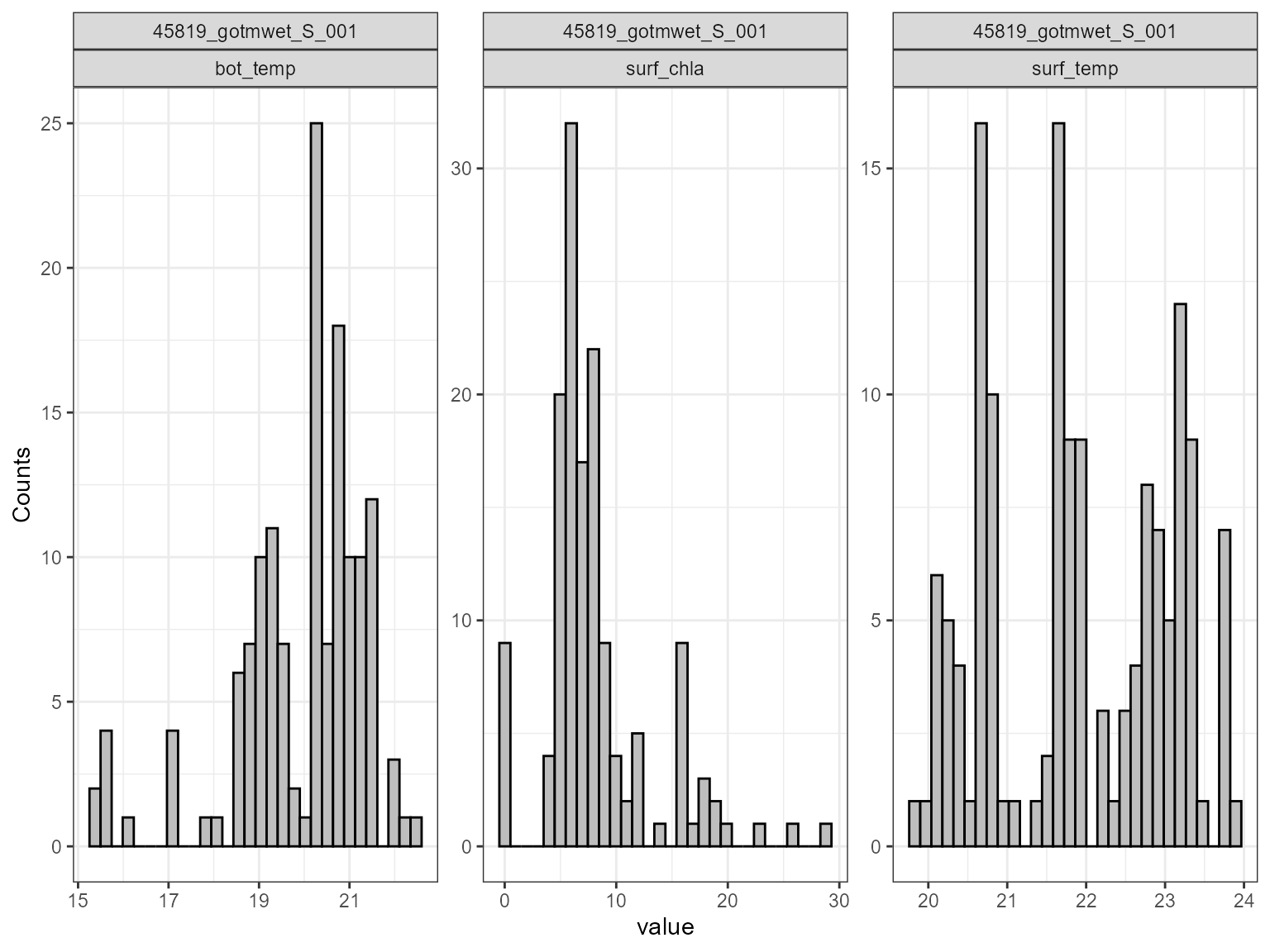
Scatter plot
The plot_scatter function plots the model output against
the parameter value for each variable. This is useful for identifying
relationships between the model output and the parameter value. For
example, the plot below shows that there is a relationship between the
model surface temperature (surf_temp_) and the parameter value of the
scaling factor for shortwave radiation (MET_radswd), and also for
surface chlorophyll-a (surf_chla) and the light extinction coefficient
(light.Kw). When there is a low parameter value for Kw, the model
chlorophyll-a is higher.
plot_scatter(sa_res)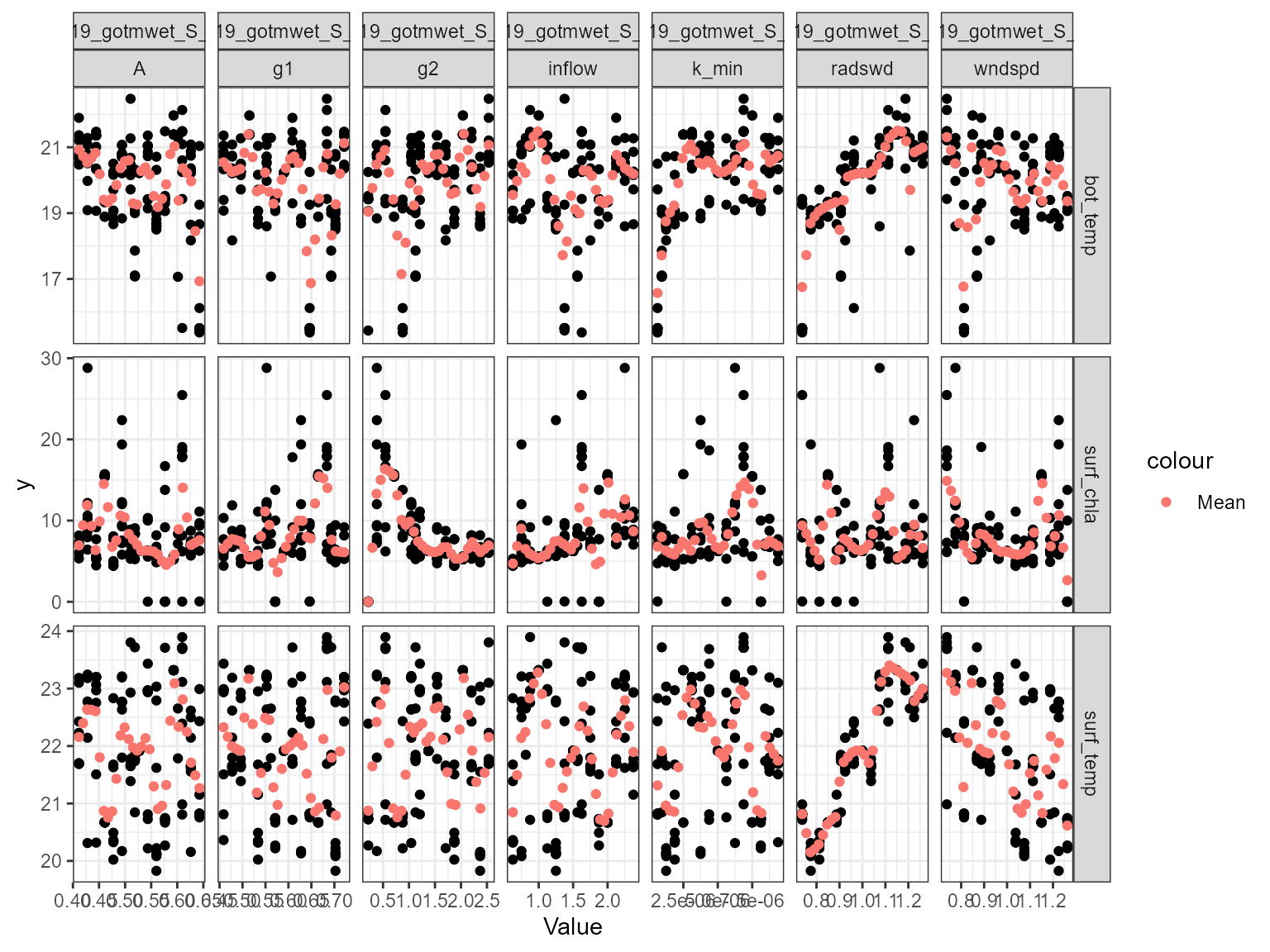
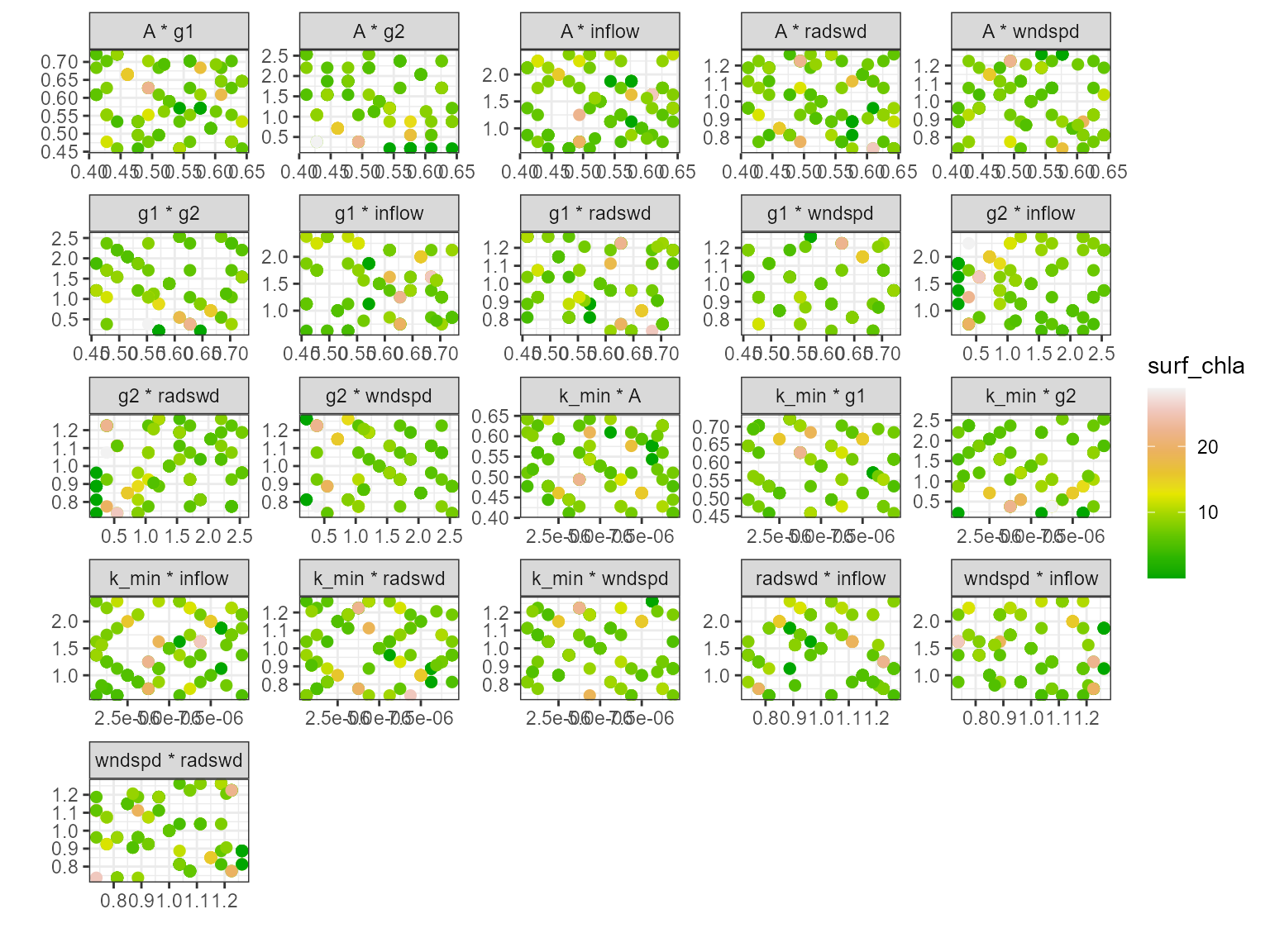
Multi-scatter plot
The plot_multiscatter function plots the parameters
against each other for each variable. The parameter on top is the x-axis
and the parameter below is the y-axis. This is useful for identifying
relationships between the parameters and response variable.
pl <- plot_multiscatter(sa_res)

pl[[1]][1]
#> $surf_temp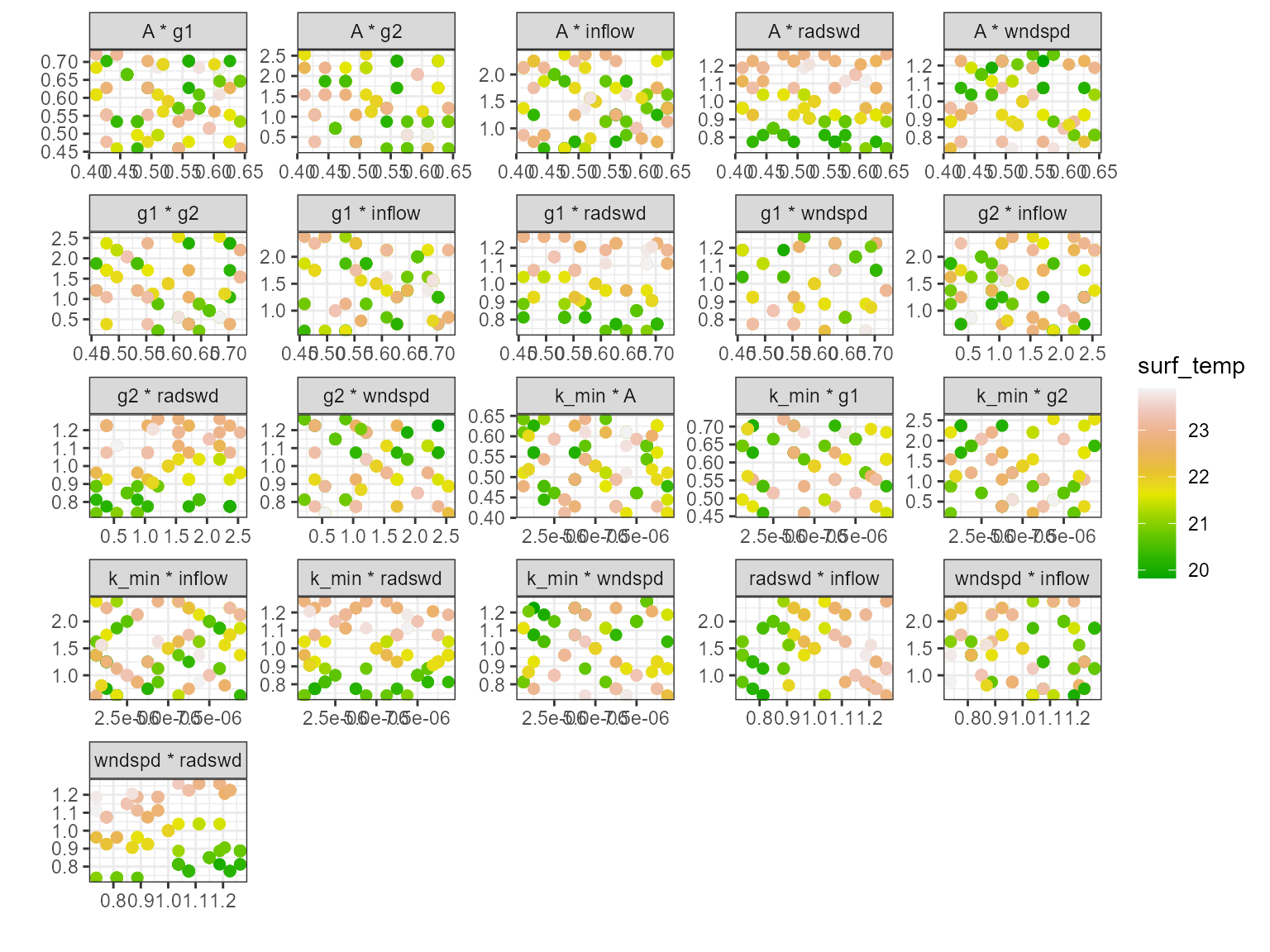
pl[[1]][2]
#> $bot_temp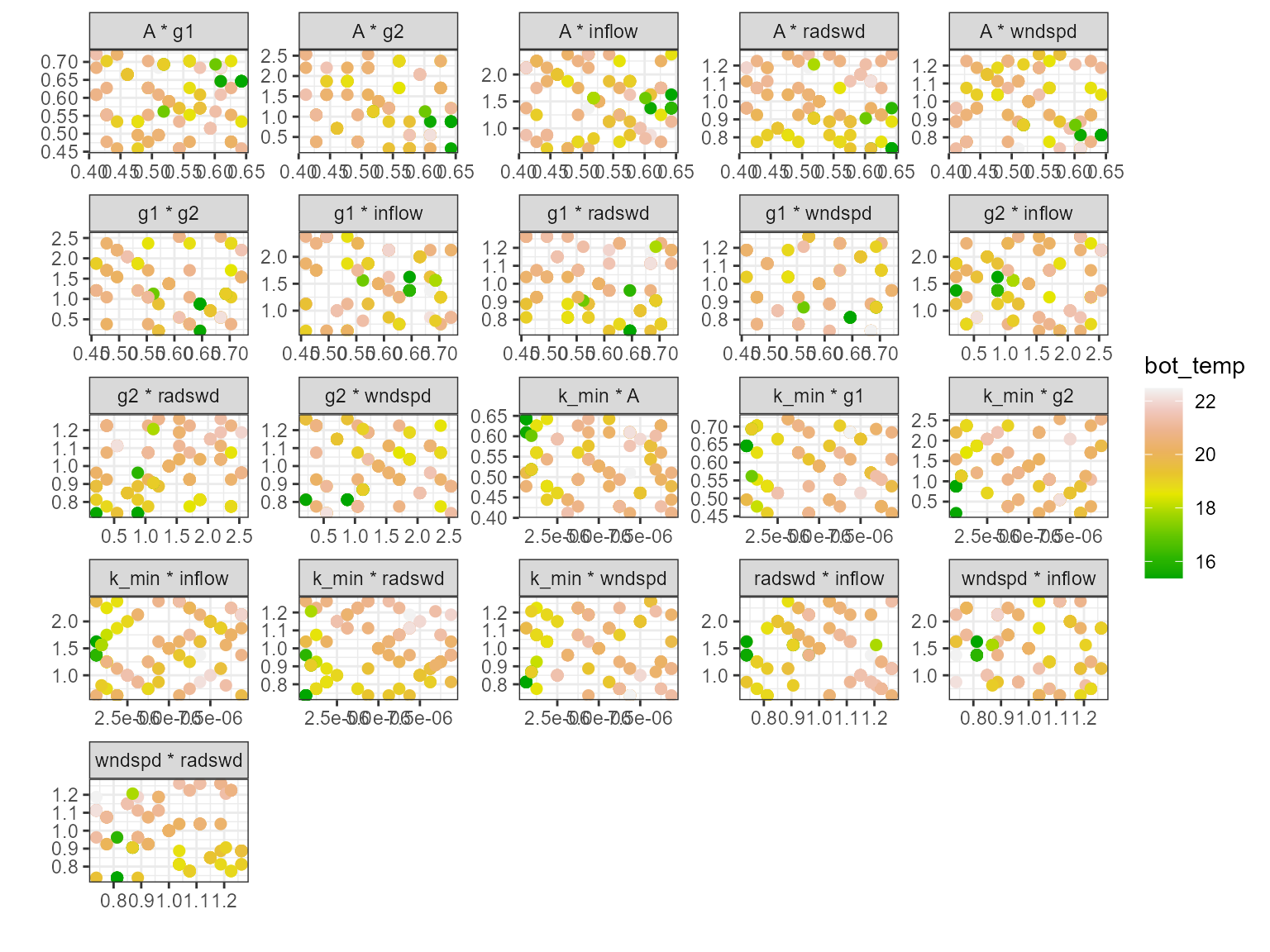
pl[[1]][3]
#> $surf_chla